Choosing between Unreal Engine and Unity isn’t a matter of one being objectively superior, it’s a matter of fit. Both engines have been battle-tested by studios of all sizes, and both have earned their place in the industry. But when you dig into the specifics: frame rates, load times, graphical fidelity, scalability, clear differences start to emerge. Here’s an honest breakdown.
Performance and Frame Rates
When developers debate Unreal Engine vs Unity in terms of raw performance, the conversation usually comes down to what kind of hardware you’re targeting.
Unreal Engine is a powerhouse, but it demands a lot in return. Its advanced rendering features — dynamic lighting, physically-based materials, complex shadow systems — push hardware hard. On high-end PCs and current-gen consoles, it delivers stunning, consistent frame rates. On lower-powered devices, though, those same features can become a bottleneck. The engine’s profiling and optimization tools are mature and well-documented, which helps — but getting Unreal to run smoothly on mid-range or mobile hardware takes real effort and expertise.
Unity takes a different approach. Its architecture is leaner by design, and that shows up in performance across a much wider hardware range. Games built in Unity tend to load faster and maintain steadier frame rates on modest machines, largely because the engine’s default rendering settings are less demanding. That’s not a limitation — it’s a deliberate design philosophy that makes Unity genuinely practical for teams targeting diverse device ecosystems.
Graphics: How Far Apart Are They Really?
This is where the Unreal Engine vs Unity debate gets the most heated and honestly, the gap has narrowed more than people realize.
Unreal Engine 5 raised the bar dramatically. Lumen, the engine’s real-time global illumination system, dynamically handles light bouncing and atmospheric depth in ways that previously required hours of pre-baking. Nanite allows developers to import film-quality assets with hundreds of millions of polygons and render them in real time without manual LOD work. Combine that with broad ray tracing support and you have a pipeline that genuinely challenges what’s possible in real-time rendering. For projects where visual fidelity is a core selling point; open-world RPGs, cinematic narrative games, architectural visualization — Unreal is hard to beat.
Unity’s HDRP (High Definition Render Pipeline) is a serious answer to that challenge. It supports advanced lighting models, volumetric effects, contact shadows, and ray tracing — and in the right hands, it produces results that can genuinely go toe-to-toe with Unreal’s output. The difference is that Unity gives you a choice: you don’t have to use HDRP. For mobile or cross-platform projects, you can drop down to the Universal Render Pipeline and still get great-looking results on hardware that would struggle with Unreal’s defaults. That flexibility is something Unreal doesn’t quite match.
Scalability and Optimization Tools
Large-scale projects expose the real differences between these two engines — and this is an area where each has a genuinely distinct philosophy.
Unreal’s World Partition system was built for exactly the kind of massive open worlds that have become standard in AAA development. It automatically divides large maps into streamable chunks and loads them based on player proximity, keeping memory usage manageable even in enormous environments. On top of that, Unreal’s LOD system, occlusion culling tools, and streaming architecture give developers fine-grained control over what gets rendered and when. The Blueprint visual scripting system makes many of these optimizations accessible without touching C++ — which significantly lowers the barrier for smaller teams working on large-scale projects.
Unity approaches the same problem through a different lens. Its Entity Component System (ECS), combined with the C# Job System and Burst Compiler, enables a data-oriented programming model that can be extraordinarily efficient for managing large numbers of entities simultaneously. If you’re building a game with thousands of AI agents, complex physics simulations, or massive procedural systems, Unity’s DOTS (Data-Oriented Technology Stack) architecture can outperform what you’d get with a more traditional object-oriented approach. It requires deeper programming knowledge to use well — but for developers who have it, the performance ceiling is very high.
Cross-Platform Development
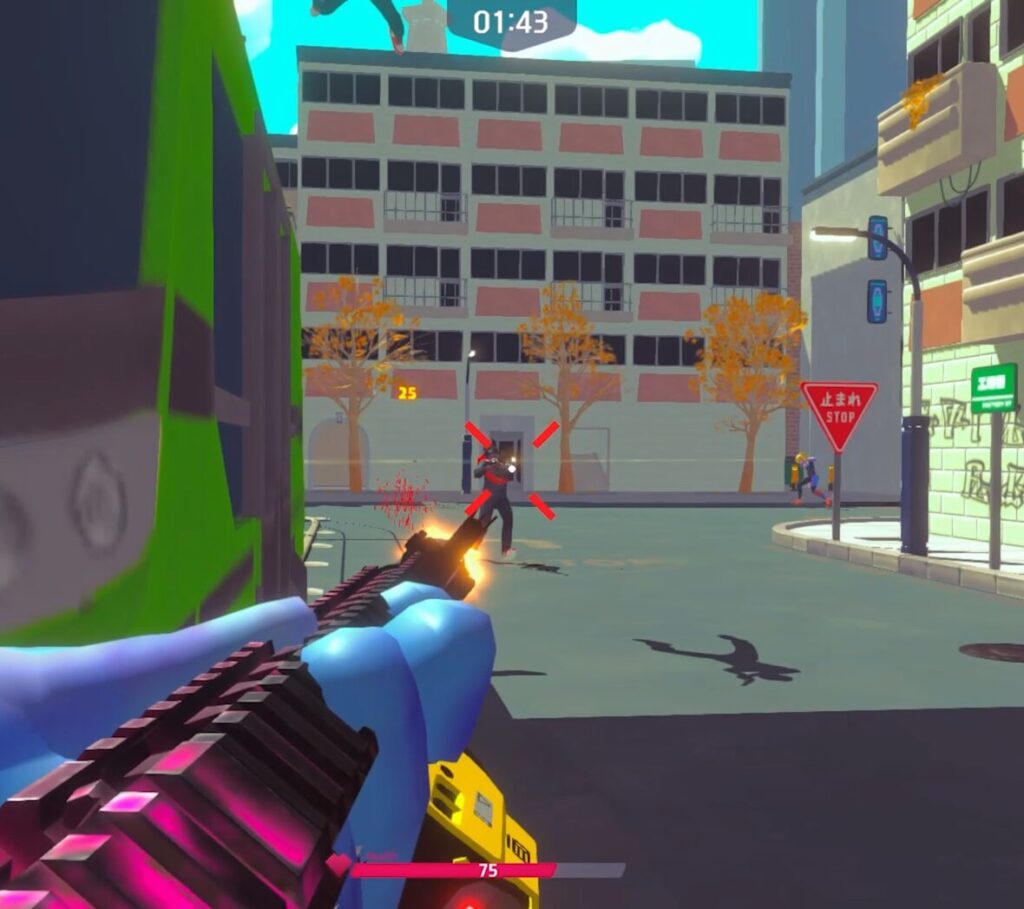
If you’re building for multiple platforms, this comparison shifts considerably in Unity’s favor — and it’s worth being direct about that. Here is one of our game Gunsbytes which developed in Unity: released on Android, IOS, Web and PC
Unity supports deployment to more than 20 platforms, including iOS, Android, PC, Mac, Linux, WebGL, PlayStation, Xbox, Nintendo Switch, and various AR/VR headsets. The engine’s rendering pipelines and asset management systems are designed with platform variability in mind, making it relatively straightforward to adapt a project across very different hardware profiles. It’s not effortless — hitting consistent performance across all those targets takes real optimization work but the tooling is genuinely built for it.
Unreal Engine supports a strong range of platforms as well, including consoles, PC, mobile, and VR/AR. Where it gets tricky is on the lower end of that spectrum. Unreal’s rendering systems were built with high-end hardware as the primary target, and while you can scale things back for mobile or lower-spec platforms, doing so requires considerably more manual effort. The engine’s automatic quality scaling helps, and Blueprint makes platform-specific logic easier to manage but there’s no getting around the fact that Unreal’s DNA is AAA console and PC development.
How Each Engine Keeps Up With the Industry
Both engines ship major updates several times a year, and both have shown they can adapt to where the industry is heading — but their priorities differ.
Epic Games uses Unreal Engine as a showcase for what’s technically possible. Features like Lumen and Nanite weren’t incremental improvements — they were fundamental rethinks of how real-time rendering works. Unreal tends to be where cutting-edge graphics technology lands first, often with production-ready implementations that smaller studios can actually use. The engine’s integration with MetaHuman, Quixel Megascans, and the broader Epic ecosystem also adds meaningful value for teams working at scale.
Unity’s update cadence has historically been more focused on broadening accessibility and platform reach. Its investment in AR and VR tooling has been substantial, and it’s consistently been the dominant engine in mobile game development for good reason. More recently, Unity has also been building out its AI and machine learning tools, with features like Unity Sentis enabling on-device inference; an area where Unreal is still catching up.
Unreal Engine vs Unity: Which Should You Choose?
The honest answer: it depends on what you’re building and who’s building it.
If your project demands exceptional visual fidelity; large open worlds, cinematic lighting, complex environmental detail — and you’re targeting high-end hardware, Unreal Engine gives you tools that are hard to match. The learning curve is steeper, and the hardware requirements are higher, but the ceiling is extraordinary.
If you need to ship across multiple platforms, you’re working with a smaller team, you’re building for mobile, or you need flexibility without sacrificing quality, Unity is the more pragmatic choice. Its cross-platform support is genuinely excellent, its ecosystem is vast, and its scalability tools, when used properly, can handle projects of surprising complexity.
The Unreal Engine vs Unity debate doesn’t have a universal winner. It has a right answer for your specific project — and knowing what that answer is comes down to understanding your constraints, your team’s strengths, and where your players actually are. You can reach us for consulting or developing your game!